Cracking the PSP GPU's transform and raster

After the VFPU math functions were cracked, I figured, let's try the same with the GE, the PSP's GPU. PPSSPP has a software renderer, mostly used as a reference, and for debugging. It's long been pretty close to accurate, but that isn't good enough for a reference, and some games really depend on the details: depth fighting in the distance, banding in fog, a seam in a sky box, a lens flare that reads back the depth buffer.

So I pointed Claude at it again, with a real PSP hooked up over USB like the last time, and let it write its own test programs for the hardware. It ran a bit over 170 experiments on the PSP. When it was done testing and applying fixes, the software renderer reproduces 125 of a set of 132 frame dumps from various games, bit-exact pixel by pixel against the same dumps played back on a real PSP.

Claude has extended my GE documentation with the findings from this project GPU section of the docs, starting with the new page on GE arithmetic.

This is the pull request implementing all this.

Below is Claude's own writeup.

Claude says

The GE is a fixed-function GPU: transform and lighting, a clipper, a rasterizer, texturing and blending, all configured with a display list. That makes it a black box with a lot of inputs and only a few visible outputs, the color and depth buffers. The job was to explain every bit of those outputs, for any input.

The VFPU work had an oracle: fp64's tables gave the exact answer to every input, on a laptop, in a second. Here there was no oracle except the PSP itself. Every question had to be turned into a display list, run on the hardware, and read back.

The setup

The tool for that is geprobe. It builds GE display lists on the host from a Python description, sends them to a small PRX on the PSP over PSPLink, and reads the framebuffer and the depth buffer back. A probe is a job: some vertices, some state, a readback.

The main difficulty is that the GE's outputs are narrow. A color channel has 8 bits and depth has 16, while the values inside the pipeline are floats with much more precision. So most of the work was designing readouts that carry the bits you want to see:

  • Points as samples. A point primitive lights one pixel with its exact depth and color. Drawing a Bezier patch as points gives every tessellated vertex its own pixel.
  • Depth windows. Setting the viewport so that a tiny range of z covers all 65536 depth values reads a transformed z down to its last bit.
  • Texture ramps. A texture whose texel value is its own position, sampled with bilinear filtering, shows where a pixel's texture coordinate landed in 1/16 of a texel.
  • Using one unit to read another. The texture matrix can take the normalized normal as its input. With the matrix scaling the interesting part up, the texture coordinate carries every bit of the GE's normalization. Shade mapping turns a light vector into a texture coordinate the same way.

The other half was a replayer. PPSSPP's frame dumps record everything a game sent to the GE for one frame. The pspautotests repository has a tool that plays a dump on a real PSP and captures the result, so every dump became a test case: the software renderer's output against the PSP's.

Floats, but not IEEE

Details: GE arithmetic, the vertex pipeline.

The first thing to fall was the number format. Display list parameters are 32-bit floats with the low 8 bits cut off, and it turned out the GE also computes in that format: a 16-bit significand, and truncation toward zero everywhere.

That alone wasn't enough, because how the operations are built matters as much as the precision:

  • The adder has no guard bits. Both operands are truncated to the precision of the larger one before adding. So adding a small offset to a large value loses the offset's low bits, before the sum is ever rounded.
  • A matrix row is one sum. No order of pairwise additions fits the data. The hardware forms the four products exactly, truncates each of them to the precision of the largest one, adds them exactly, and truncates once. The same unit combines the world, view and projection matrices before any vertex is transformed, and computes dot products, the texture matrix and the vector to a light. If that sounds familiar from the VFPU post, it should: the VFPU's vdot, as fp64 worked out, aligns and sums its terms the same way, with no order between them. It's the more careful design of the two, keeping guard and sticky bits on its products and rounding the final sum to nearest, where the GE just truncates.
  • There's no divide. The perspective divide multiplies by a reciprocal from a table of 128 linear segments. Normalization uses a reciprocal square root with the same layout. Neither is the VFPU's interpolator, which is quadratic.

A second reciprocal

Details: the raster pipeline.

The rasterizer was the biggest surprise. Depth isn't z/w per pixel, and it isn't walked along edges like on the PS2 either. Each triangle gets fixed-point planes for its depth, color, fog and texture coordinates. The setup divides by the triangle's area with a third table, finer than the first two: 256 segments of 16-bit indices.

Fitting that table took a while, and finishing it took games. The probes pinned most segments, but left a few with a window of possible values. Blade Dancer's depth needed one of them at the top of its window, and a single Gouraud-shaded test triangle, with 37 pixels off by one, needed another. Both landed on the same formula as nearly all the others: the exact reciprocal at the segment start, rounded down to a multiple of 16. The table's starting values are now that formula, except for the first segment.

With the planes, depth, colors and texture coordinates all fell into place, including details nobody would guess:

  • the plane is anchored at the leftmost vertex, unless the long edge is the triangle's right side;
  • the mip level uses one q per 4-pixel span, taken at the span's second pixel in the direction the row is walked;
  • a 1:1 bilinear sprite only lands exactly on texel centers when its area is a power of two, since the gradient is a fixed-point reciprocal of the area.

Lighting

Details: GE lighting.

Lighting had a known bug report behind it: the hair shine in iDOLM@STER SP looked wrong (#12376). The specular half vector uses a viewer direction taken from the view matrix's third column, not (0, 0, 1). The specular power is Mitchell's approximation, straight lines between powers of two, with the exponent cut to 4 mantissa bits. And light colors are scaled by 8-bit factors with ((2x + 1)(2s + 1)) >> 10, which turns out to be the same product the blender uses.

The last lighting bug came from a single vertex in Syphon Filter (#13568), whose spot factor was 33 on the PSP and 32 in the emulator. The GE never forms a world-space position for lighting. The vector to the light is one row sum, of the light position minus the world translation and the model position times the world matrix.

Curves

Details: curves.

Bezier and spline patches turned out to be evaluated without floating point arithmetic, even though every control point is a float.

De Casteljau's algorithm evaluates a Bezier curve with nothing but linear interpolation. Take the four control points, lerp each neighboring pair at the parameter t, and you have three points; lerp those, and you have two; lerp once more, and you're on the curve. A patch does that for each column of control points, then once more along the row of results. So the whole evaluation is a few dozen lerps, a + (b - a) · t.

The GE does each lerp as integer arithmetic. It looks at the two operands' exponents and takes the larger one, then writes both operands as 16-bit integers in units of that exponent's lowest bit, truncating whatever doesn't fit. The parameter t is an 8-bit fraction, k/256. The lerp is then A + floor((B - A) · k / 256) on those integers, and the result is a float again, at that same exponent. Lerping 1.5 and 0.001, for example: at 1.5's exponent, the lowest bit is 2^-15, so 0.001 becomes 32 units (0.0009765625) before anything else happens, and the result can't carry more precision than that. The fixed point is chosen anew for every lerp, which makes it a kind of block floating point: an alignment shift, an integer multiply by k, and a truncating shift, with no normalization in between.

At k = 0 and k = 256 the lerp passes an operand through untouched instead of truncating it, and that detail decides the normals at patch edges, which come from the tangents. With all of that, Coded Arms (#21391), Pursuit Force (#11216), Test Drive (#21763) and LocoRoco have exact depth.

Oddities

Details: the raster pipeline.

A few things are hard to call anything but quirks:

  • A triangle taller than about 2730 pixels lights extra pixels along its long edge, one per 4-pixel span, as if a 17-bit field overflowed.
  • The REGION1 register, which looks like a clip rectangle, translates the drawing. For odd x offsets it also reverses each group of 4 pixels.
  • A pixel drawn past the framebuffer's stride lands at the start of the next row.

The texture cache

Details: the texture cache and self-texturing.

The GE reads textures through an 8 KB cache that the GE's own drawing doesn't update, which is normal for a GPU of this generation. It only shows when a game textures from the buffer it's drawing to, as bloom and blur passes do. A texture that fits in the cache stays there until the next TEXFLUSH, across draws, so a game that blurs a small buffer onto itself several times reads the first pass's input in all of them (Final Fantasy Type-0, #20104). Larger self-textures are mostly read as they were before the draw, in 8-row blocks loaded the first time a primitive needs them.

Bugs that weren't the GE

Many differences between the emulator and the PSP turned out not to be the GE at all:

  • The replayer had bugs. Its list buffer could wrap and let the GE run a lap of stale commands, which drew a screen-filling skinned triangle that wasn't in the game. It also didn't wait for the GE to finish before CPU and DMA writes to VRAM. Fixing those made several "unexplained" dumps exact without touching the emulator.
  • The software renderer had a race. I spent a probe on a theory that the GE caches recently written pixels, to explain a blur in Tokimeki Memorial 4 (#6379). The probe showed the PSP simply draws in order. The rows that differed changed from run to run in the emulator, because two of its rendering threads raced over pixels past the buffer's stride.
  • Merging primitives changes the result. The software renderer merged adjacent sprites, and drew rectangles made of two triangles as one sprite, for speed. Since every primitive has its own planes, both changed which texels were sampled.

What came out

Game frame dumps exact against the PSP125 of 132
Framedump tests (frametests.py) exact29 of 30
Hardware probesabout 174

The rest are known cases:

  • Swizzled depth reads. These dumps read the depth buffer through its swizzled mirrors, which we deferred. Fixing those is next.
  • Lazy texture loading. Two self-texturing effects depend on the GE loading textures in 8-row blocks, which isn't modeled yet.

Three dumps used to hang the PSP's replayer, which looked like a GE problem and wasn't: old dumps packed their data unaligned, which the PSP's CPU faults on, and one restored a CLUT load from an address that was only valid in the game. With the replayer fixed, all three are exact.

All of the arithmetic lives in one file, GPU/Software/GEMath.cpp, with unit tests. A selection of the experiments became pspautotests, gpu/exact, recorded on a PSP, so a change that moves the renderer away from the hardware shows up in the tests.

Lessons

  • Design the readout first. Each probe was only as good as the number of bits it could get out of the GE. Most of the breakthroughs came from a new way to read something out, not from a new hypothesis.
  • Fit to the probes, then to the games. A table fitted to synthetic tests is right where the tests looked and loose everywhere else. Game dumps found the loose spots.
  • Suspect the pipeline around the hardware. The replayer and the emulator's own threading each produced differences that looked like GE behavior.
  • The hardware is cheap, in the hardware sense. Whenever a hypothesis needed per-pixel floating point math, it was wrong. The right answers were always the cheap ones: tables, truncation, narrow fields, shared units.
  • Be nice to the PSP. A readback that's too big or two jobs at once wedges it until someone resets it by hand.
Cracking VFPU math functions using AI

The PSP has a vector unit, the VFPU, which is set up as a traditional MIPS co-processor that shares the instruction stream with the main CPU, but has its own pipeline. Much like modern GPUs it has a special function unit, for functions like sin/cos, exp2/log2, square root, reciprocals, etc. It has long been know exactly what these instructions do, but not how they do it - they all return approximations made in an unknown way, none of them return the correctly rounded IEEE result.

  • vrcp (reciprocal)
  • vrsq (reciprocal of square root)
  • vsqrt (square root)
  • vexp2 (pow(2.0f, input))
  • vsin (sin, with 4.0 = one lap instead of 2*PI)
  • vcos (cos, with 4.0 = one lap instead of 2*PI)
  • vasin (arc-sine, same 4.0 circle system)
  • vlog2

There's also vrot which is a convenience function for sin+cos for building rotation matrices.

fp64, a long-term contributor to the project, has already implemented bit-exact versions of these (#16984, etc), by dumping the full result tables from a real PSP and adding correction tables on top of close approximations. This costs multiple megabytes of memory though, and some performance - it would be much neater if we knew the underlying functions. fp64 has also implemented a bit-exact version of the VFPU's dot product instruction, which really deserves its own article.

Encouraged by skmp's work reversing similar instructions on the Sega Dreamcast, Reversing the SH-4 fpu with the help of three AI models, I thought I'd simply set Claude on it.

And lo and behold, it worked. It took Claude Opus 5.5 about an hour.

This will save PPSSPP a few megabytes of shipped tables in future versions, and we will enable accurate emulation of these functions by default due to the somewhat faster performance than the previous method.

The pull request: VFPU: Replace fp64's correction tables with accurate implementation of special functions.

Below is Claude's own writeup (very lightly edited) about how it did it.

Claude says

PPSSPP has had the functions bit-exact for a while, thanks to fp64's work in issue #16946. The method was careful measurement: an easy-to-compute base approximation, plus per-64-input correction deltas, plus lists of exceptions. It shipped as about 4.9 MB of .dat binary files. That's the right way to get correct answers when you don't know the algorithm. It also leaves an itch: the hardware certainly doesn't have 5 MB of ROM for this. What does it actually do?

This post is about finding that out, one function at a time, without ever looking inside the chip. The answer turned out to be a single, rather textbook circuit. All eight functions now come from about 10 KB of coefficients, bit-exact over every one of the 2^32 float inputs.

The setup

fp64's code is an exact oracle. It agrees with the hardware on every input, and it runs in a second on a laptop. So I could dump every output of every function, for example all 2^23 mantissas of 1/x over [1, 2), and interrogate the data as much as I liked. Before relying on that, a new hardware test (pspautotests cpu/vfpu/exact) ran special values and exponent sweeps on a real PSP. It agreed with the oracle, and showed a few mismatches in the other CPU backends along the way.

The other tool that mattered was exhaustive checking. A hypothesis about a 23-bit function isn't right until it reproduces all 2^32 inputs. That takes 30 seconds, so there's no excuse.

First attempts: good enough isn't the answer

The obvious guess is a piecewise polynomial. Fit a quadratic to each chunk of 1/x and see how many outputs come out exactly right. The answer was about 93%, whatever chunk size or polynomial degree I tried. Fitting coefficients that are floats and evaluating them with the VFPU's own dot product, which has its own exact rounding rules, got about 92%. One suggestion from Henrik was that the functions are built out of vdot operations, since on the Dreamcast the FIPR inner-product unit turned out to be reused by the function approximator. That was a good lead, but a single vdot of float coefficients also stalled at 92%.

The failures had a consistent shape. The best possible real-valued quadratic missed by about one 24-bit ulp, in a band exactly one ulp wider than the output's truncation window. Something discrete was going on underneath, and least-squares fitting would never find it. I switched to feasibility instead of fitting: for a candidate formula, can any coefficients reproduce every output exactly? Each output then turns into an interval constraint on the unknowns, and intervals intersect cheaply. This question, rather than "how close can I get", drove everything after it.

Finding the segments

The first structural question was how many pieces the function is made of. Within every run of 64 consecutive inputs, the output is exactly a straight line. Past that, I checked how many of those 64-input intervals can share one slope. The answer was 1,024 intervals, which is 2^16 inputs, and never 2,048. So the top 7 bits of the mantissa pick one of 128 segments. Within a segment the slope is shared, and it equals the true derivative at the segment's centre. That's the textbook layout of a hardware quadratic interpolator: a small table indexed by the top bits, plus arithmetic on the rest.

The fingerprint

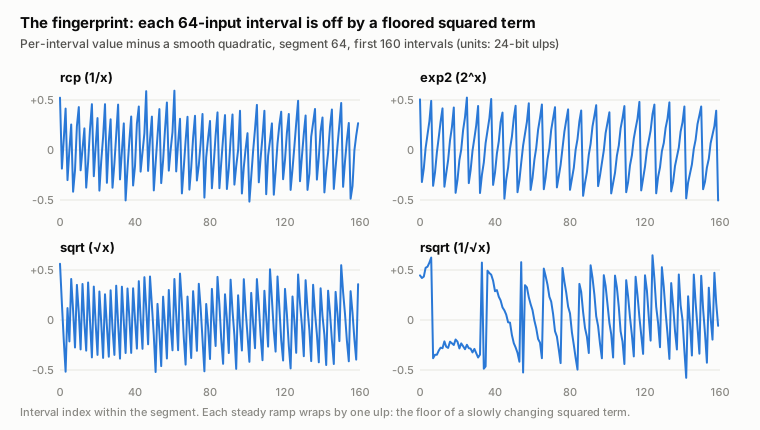
With the slope pinned, each 64-input interval still carried its own offset. Subtracting a smooth quadratic from those offsets left this:

Sawtooth of per-interval errors for rcp, exp2, sqrt and rsqrt

It's a sawtooth, one ulp tall, and the same in every function. The rate at which each ramp climbs matched something specific: the local slope of that function's squared term. For rcp that's −0.273 ulps per interval, and the ramp climbs 0.28. For exp2 it's −0.151, and the ramp climbs 0.15. rsqrt's ramp looks different, but its slope of −0.958 aliases to a small drift, exactly as a floor would make it.

So the squared term is floored to whole ulps on its own before it is added in. The linear term isn't floored with it, and neither is the total. That's also why no polynomial could fit: a floor with its own phase is invisible to least squares.

A long detour, and some bugs of my own

Knowing that the squared term is floored didn't immediately say how. I tried floors with a phase and floors at quarter and half ulps. I tried truncated squarers that drop low partial products, split squarers, squarers keeping only 12 significant bits, and two-step products. All of them came out at the same wall: 99.65% of outputs right, with the rest one step off, at points where the squared term sat within about 0.015 ulp of an integer.

Several of the dead ends were my own bugs. One search stepped a coefficient so coarsely that it could never hit the true value. One extraction subtracted a constant twice. A zsh quirk made one parameter sweep silently test nothing. When a hypothesis fails cleanly, the right move is to check the checker first.

The break: identical margins

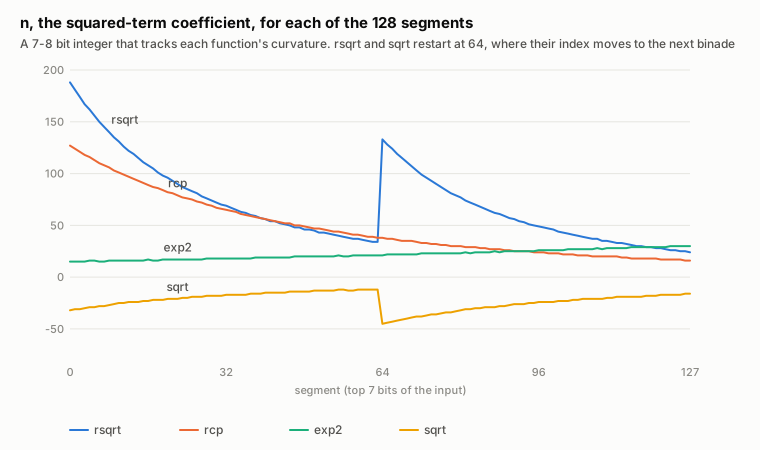
What broke it open wasn't a new hypothesis but a coincidence in the output of a sweep. I fitted every segment of rcp separately and printed the best-fit squared coefficient and its error margin. Neighbouring segments often showed identical values to four decimals, for example segments 115 to 120 of rcp all at 143.9636. Identical decimals meant identical integer data.

Two things followed. The squared coefficients are all multiples of 8/2^20, so the coefficient is a small integer n, with a squared term of n·t²/2^17. And the per-interval integer sequences were byte-for-byte identical across functions: exp2's segment 32 matches rcp's segment 116, and rsqrt's segment 100 matches rcp's segment 54. The squared-term circuit is one unit shared by all of them, and its output depends only on n and t.

Squared-term coefficient per segment for rsqrt, rcp, exp2 and sqrt

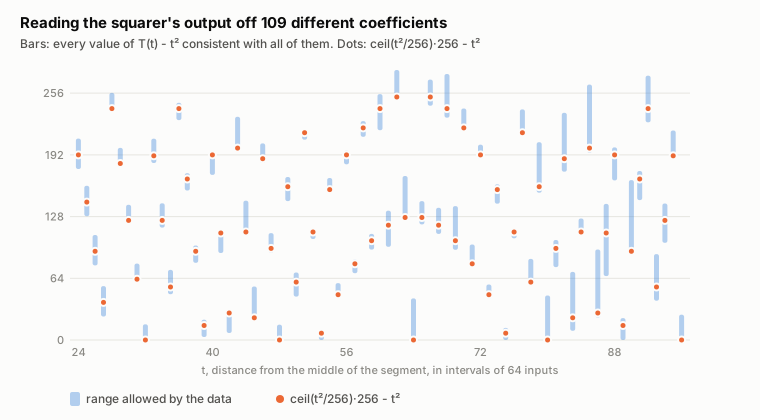
That turned the squarer from a guess into a measurement. With 109 different values of n in the data, I could solve for the squarer's output T(t) directly. For each t, each n constrains T(t) to an interval, and 109 intervals intersect very tightly:

The squarer output recovered from data, against ceil(t squared over 256) times 256

The squarer rounds t² up to a multiple of 256. With that, the squared term is (n · ⌈t²/256⌉) >> 9, and it matched every n and every t with zero mismatches.

The model for a segment is then:

t = |(x2 >> 6) − 512|
v = c0 + ((m · x2) >> 17) + ((n · ⌈t²/256⌉) >> 9)
result = v & ~3   (in ulps of the segment's exponent)

Here c0 is a whole number of ulps, m has about 18 bits and n has 7 to 8. For each segment and each candidate (m, n), every output pins c0 to an interval, so fitting a segment is a scan over a few thousand m values. All 512 segments of rcp, rsqrt, sqrt and exp2 fit. The resulting code matched fp64's over all 2^32 inputs on the first run, apart from one bug in the wrapper arithmetic.

sin: counting backwards

sin didn't fit, at any segment size. The clue came from its few non-monotonic outputs, places where the output steps the wrong way. For rcp those only happen between inputs 64k + 63 and 64k + 64, at the interval boundaries. For sin they happen one input later, between 64k and 64k + 1. That's what you get if the hardware counts from the other end. It indexes the quarter wave with y = 2^23 − x, which amounts to computing sin as the cosine of the complementary angle. Re-indexed that way, the same interpolator fits.

What remained was scale. Most of sin's range is below 0.5, and some segments cross into a lower binade partway through. The rule turned out to be simple. Each segment works in the ulps of its first, largest output, and truncates to 4 of those even for results that drop into the next binade down. asin confirmed it from the other side. Its values rise within a segment, so results that climb into the next binade keep one extra bit. Those are exactly the 1.25% of asin outputs with 23 significant bits instead of 22.

log2: the hardest one

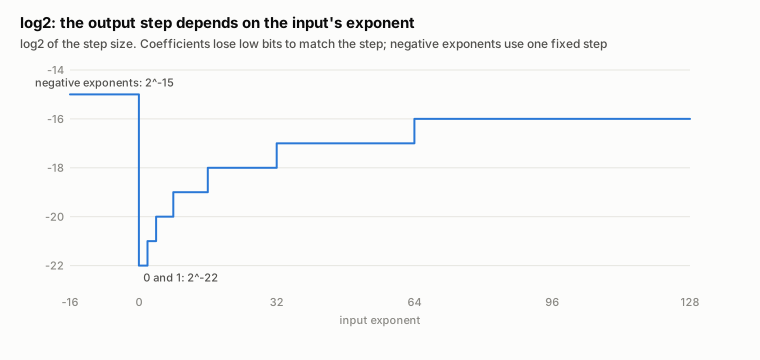
log2 for inputs in [1, 4) fitted immediately. For larger inputs, and for inputs below 1, it didn't. The result is exponent + log2(1.m), and as the exponent grows it takes up bits the fraction can no longer use:

log2 output step by input exponent

Every hypothesis about how the hardware reaches the coarser step failed for a while. The outputs below 1 looked like a different, less accurate computation altogether. The resolution was that the datapath cuts the coefficients down to match the output's precision. At level d, where the step is 2^(d+2) units:

  • the slope m loses its low d + 2 bits;
  • the squared coefficient loses the low d bits of its magnitude;
  • c0 absorbs the part of the squared term that was dropped, as evaluated at the segment's edge.

For negative exponents that is level 7, with a step of 2^-15. There the squared term disappears entirely, which is why that path looked like plain linear interpolation. The sum is truncated toward zero, which rounds negative results up. That single rule also covers the region just below 1.0 that fp64's code handled as a special case, including the sign of −0.

What came out

TablesInterpolator
Data4.9 MB loaded from assets/vfpu10.5 KB of static const coefficients
rcp4.2 ns3.6 ns
rsqrt5.4 ns3.6 ns
exp26.3 ns3.9 ns
log27.1 ns5.1 ns
sin14.6 ns5.9 ns
asin6.0 ns3.6 ns

All are bit-exact over every 32-bit input. vrot needs sine and cosine together, and sharing the argument reduction makes the pair about 10% faster.

What does this say about the chip? It's the design from the literature on hardware function evaluation, for example Piñeiro, Oberman, Muller and Bruguera's minimax quadratic interpolator, or NVIDIA's multifunction interpolator (Oberman and Siu, 2005), which covers much the same set of functions. It has a 128-entry ROM per function, a squarer that sees only the top 10 bits of the offset, and coefficient widths trimmed to what the output needs. Whether the final adder is shared with vdot, as on the Dreamcast, can't be told from outputs alone. The separately truncated products are certainly compatible with it.

Lessons

  • An exact oracle plus exhaustive checking beats cleverness. Every idea here was cheap to test against all 2^32 inputs, so wrong ideas died quickly.
  • Ask whether it's possible, not how close you can get. Least squares hid the discrete structure. Interval feasibility exposed it.
  • Watch for suspicious coincidences. Identical margins across segments was the single most useful observation. It came from output I wasn't looking for.
  • Suspect your own tools. Several "impossible" results were bugs in my search code.

Talking to an App Store Review brick wall

UPDATE!!!

The separate Gold app has now been retired, and replaced with an in-app purchase. More information here.

Original article below

The App Store situation

Here's an overview, followed by the actual conversation with App Store Review.

PPSSPP is an open source PSP emulator, that lets you run your own PlayStation Portable games on your various devices. PPSSPP is officially available on Android through Google Play, PC, Mac, and recently iOS through the App Store. There is also a Linux flatpak build. The project is ongoing for more than 11 years now, and has been downloaded over 100M times. It has millions of active users on Android.

PPSSPP is completely free to download (and compile if you want, since it's open source) but there's also an optional paid version to finance the development and maintenance of the project, buildbot, website, etc.

The paid "Gold" version is, except cosmetically, identical to the free version. I've chosen this monetization model on the App Store to keep it consistent with the other platforms, where it's often the most practical one.

In May this year, Apple changed its policies and started allowing game console emulators on the App Store. The change was of course followed by a bunch of emulator releases. Here are a few examples:

  • Delta (Website) - Nintendo consoles (NES, SNES, GB, GBC, GBA, N64, DS). Open source.
  • RetroArch (Website) - Multisystem emulator supporting a large amount of game consoles. Open source.
  • BigPEmu (Website) - Atari Jaguar emulator. Closed source.
  • Folium (Website) - multisystem emulator supporting various portable Nintendo consoles. Open source.
  • ArcEmu - Nintendo GB/GBC/GBA emulator for Apple Watch.

For some time now, I have simply not been able to update the paid iOS version on Apple's App Store. The free version flies through review in a few hours, while the near-identical paid version is just stuck.

Below is an authentic conversation with App Store Review. This is the second conversation, I previously had a much longer one, but it disappeared when I submitted a new build. The arguments were the same, just more rounds of back-and-forth.


Apple App Store Rejection, initial message

Submission ID: 7fe4cdbf-80a6-43ba-a3d4-e54b73b14267

Review date: November 04, 2024

Version reviewed: 1.18

Guideline 4.1 - Design - Copycats

Your app's metadata contains content that is similar to third-party content, which may create a misleading association with another developer's app or intellectual property.

We understand that the mentioning of the console is to provide more context to the users, including trademarked terms such as "PSP" in a non-referential way is still not appropriate.

Next Steps

It would be appropriate to revise the app and metadata to remove this third-party content before resubmitting for review.

If you have the necessary rights to distribute an app with this third-party content, attach documentary evidence in the App Review Information section in App Store Connect and reply to this message.

Resources

Many factors may contribute to a guideline 4.1 rejection, including but not limited to the following examples:

  • Using the app metadata or developer account information to create a misleading association with another app.

  • Including irrelevant references to popular apps in an app's name or subtitle.

  • Copying the content, features, and user interface of popular apps.

Learn more about guideline 4.1.

Guideline 4.3(a) - Design - Spam

We noticed your app shares a similar binary, metadata, and/or concept as apps submitted to the App Store by other developers, with only minor differences.

Submitting similar or repackaged apps is a form of spam that creates clutter and makes it difficult for users to discover new apps.

Next Steps

Since we do not accept spam apps on the App Store, we encourage you to review your app concept and submit a unique app with distinct content and functionality.

Resources

Some factors that contribute to a spam rejection may include:

  • Submitting an app with the same source code or assets as other apps already submitted to the App Store

  • Creating and submitting multiple similar apps using a repackaged app template

  • Purchasing an app template with problematic code from a third party

  • Submitting several similar apps across multiple accounts

Learn more about our requirements to prevent spam in App Review Guideline 4.3(a).

The app appears to contain copyrighted video game files,

Apps and their content should not infringe upon the rights of another party. In the event an app infringes another party’s rights, the app's developers are responsible for any liability to Apple because of a claim.

Next Steps

Either remove the copyrighted third-party content from the app and its metadata or provide a written affirmation that you have the appropriate rights or license to use and distribute the third-party copyrighted materials.

Resources

Learn more about intellectual property requirements in guideline 5.2.2.

Support

  • Reply to this message in your preferred language if you need assistance. If you need additional support, use the Contact Us module.

  • Consult with fellow developers and Apple engineers on the Apple Developer Forums.

  • Provide feedback on this message and your review experience by completing a short survey.


My initial response

Please read! If you are not a robot, please indicate that you read the below, and respond to it properly.

Five minutes after this rejection was made, my near-identical free version of this very same app ("PPSSPP - PSP Emulator"), on the same account, with the same metadata, and same files, and essentially the same functionality, was APPROVED by App Review. Why not this one? It's 99.9% the same app, on the same account.

OK, so once again, I will refute your complaints point by point.

4.1 - Design - Copycats

Any games console emulator obviously needs to be able to mention what system it emulates. Anything else is unreasonable. Other emulators like Folium do this too.

4.3(a) - Design - Spam

I am the original author of this app. It is not spam, it's just the paid version of PPSSPP - PSP Emulator.

"The app appears to contain copyrighted video game files"

There are no such files. If there's a file you have a complaint about. PLEASE LET ME KNOW EXACTLY WHICH ONE. The filename please.


Apple App Store Reply

Hello,

Thank you for information.

However, to be in compliance with guideline 5.2.2, the app can open video games files without the appropriate authorisation from the right holder. it would still be appropriate to either remove the copyrighted third-party content from the app and its metadata or provide a written affirmation that you have the appropriate rights or license to use and distribute the third-party copyrighted materials.

To be in compliance with guideline 4.1, the app uses copyrighted terminology in the app name (PSP) in a non - referential manner, it would still be appropriate to revise the app and metadata to remove this third-party content before resubmitting for review.

To be in compliance with guideline 4.3, it would still be appropriate to review your app concept and submit a unique app with distinct content and functionality.

We look forward to reviewing your resubmission.

Best regards,

App Review


My second response

Hi again..

First, can you tell me what changed? This app was APPROVED by App Review a few months ago, but suddenly App Review started rejecting updates - but only for this paid version of the app, the free version still gets every update approved. I am simply trying to submit a bugfix update, no substantial change has been made to what the app does. Additionally, you APPROVED the free version of the app ("PPSSPP - PSP emulator"), on this very same developer account, just two days ago. It has all the same functionality.

Second, I believe that you have an automated system that has somehow started triggering on just this app. Is this the case? The three points are simply wrong. Again, point by point:

As for 5.2.2, there are, again, no copyrighted game files being shipped with the app. As for playing unauthorized files, just like an MP3 music player will play files that the user owns, this app will play retro PSP games that the user owns. This app is not in any way a violation of 5.2.2. Apple started allowing game console emulators with this type of functionality earlier this year, some other examples that are live on the App Store are Folium and RetroArch, and of course PPSSPP, the free version.

As for 4.1, for a user to understand what retro game console the app emulates, we really have to mention the name PSP. This is not any kind of copyright violation, and the free version of the app does this as well and was approved.

As for 4.3, it's really quite insulting to be told to "review my app concept". This app is serious software and is one of the most popular retro game console emulators in the world, with hundreds of millions of downloads on other platforms, and four million downloads of the free version on iOS . It has a great reputation in emulation circles. Here's the wikipedia page, which confirms that I, Henrik Rydgård, am the original author: https://en.wikipedia.org/wiki/PPSSPP

So please, consider the facts above.


Apple App Store Reply #2

Thank you for your reply.

Please note that we are unable to share with you the review process or other information regarding other apps.

All apps, including updates, undergo a complete review to ensure compliance with the most current version of the App Review Guidelines.

To be in compliance with guideline 5.2.2, the app can open video games files without the appropriate authorisation from the right holder. it would still be appropriate to either remove the copyrighted third-party content from the app and its metadata or provide a written affirmation that you have the appropriate rights or license to use and distribute the third-party copyrighted materials.

To be in compliance with guideline 4.1, the app uses copyrighted terminology in the app name( PSP) in a non - referential manner, it would still be appropriate to revise the app and metadata to remove this third-party content before resubmitting for review.

To be in compliance with guideline 4.3, it would still be appropriate to review your app concept and submit a unique app with distinct content and functionality.

Let us know if you have any further questions.

Best regards,

App Review


Conclusion

There seems to be no progress possible, despite Apple's complaints being entirely invalid:

  • The essentially-identical free version of PPSSPP flies through review every time, while the paid version is stuck. Why aren't the two treated the same?
  • Most of the other approved emulators also mention the names of the consoles they emulate in the App Store description - otherwise it's kind of hard for users to know what to download.
  • There are no copyrighted game files included. Emulators playing user-provided games are allowed on the App Store now.
  • It's the original app, not a cheap re-upload of someone else's content.

I tried appealing the previous conversation to the App Store review board, with no result.

It's just so frustrating. I want to get a bugfix update out, and I can't.

If you are an Apple employee and have any way to help, or any information or tips that might be helpful to get past this roadblock, contact me at [email protected].

At this point, I'm starting to think that the best way forward might be ditching the separate Gold app and switching to in-app purchase, though there are some practical issues with that.

The 1.15.x release process

The 1.15.x release series has been out now for a couple of weeks, including some point-releases. These have been made mostly as direct response to crash reports but also for some other fixes. Time to summarize!

  • Overall crash rate is down by about 20% from previous releases
  • It took three point-releases to get there though! A few new crashes emerged in this release, but I also fixed some old ones while at it.
  • People seem generally happy with the release, but there have been some negative reviews coming in, mostly about slowdown on older devices, control mapping problems, and even about how the new icon is ugly.

Thus, a fourth point-release is rolling out about now, 1.15.4, with the following changes:

  • Some optimizations to claw back most of the lost performance
  • The Android device resolution / HW scaler setting will be back
  • Fixes for running things directly out of the Downloads folder using the Load button on newer Android versions
  • Fixes for some control mapping problems
  • On devices that don't understand the new icon format, use the old icon instead of an ugly auto-generated one.
  • Fix loader bug triggered by WWE 2009, preventing it from starting
  • Tilt control gets back a lost setting (inverse deadzone, or "low end radius")
  • A couple of updates to compat.ini.

Hopefully this will be enough to avoid a fifth!

While looking at performance to eliminate some regressions, I found plenty of additional room for improvements, and I have a bunch of good changes pending. Mostly though, these will need serious testing so I cannot merge them until after we're done with the main series of 1.15.x releases, to keep things simple. But expect serious performance improvements on old devices in 1.16!

Anyway, enjoy!

The lens flare in Burnout

PSP rendering tricks - a new blog post series

In these posts, I'm going to look at some of the more interesting visual effects that games accomplish on the PSP, and how they do it. The PSP's GPU is very limited by modern standards, but it's still capable of quite a lot of interesting things if your really know how to use it.

Burnout Dominator's lens flare effect

First up, one of the trickiest lens flare effects seen on the PSP.

Lens flare effects are easy to do on modern GPUs. There are lots of different approaches, both image-based which can handle light sources of any shape but are generally not very detailed, and sprite-based, which are more limited in terms of the light source, but can look really complex and colorful. There are queries that can be used to figure out how many pixels actually got rendered when drawing the sun sprite, for example, that can be used to control the size and shape of the lens flare on the next frame, or you can read back the Z buffer directly while drawing the sprites.

On old-school, fixed-function hardware such as that of the PSP, where you can’t even do multitexturing, and definitely can’t run any shader code, people had to get quite imaginative to achieve these effects. And the authors of Burnout Dominator certainly were, as we will see.

Let's start by looking at the wrong result - the way it was in PPSSPP before I started investigating the effect:

As you can see, the lens flare effect is visible going into the tunnel, and through various trees and stuff.

There are two main parts to rendering a traditional lens flare correctly:

  • Determining the location, and measuring the sun coverage (how brightly the flare should render should be based on how much of the sun is covered by blocking things).
  • Using the determined coverage value, adjust the brightness of the lens flare. If the source of light is fully covered, no lens flare should be drawn, while if it’s partially covered or not covered at all, the lens flare should be drawn but with a brightness adjusted by the coverage.

Computing the sun coverage

To achieve this, here’s what Burnout Dominator does to measure the sun coverage, every frame:

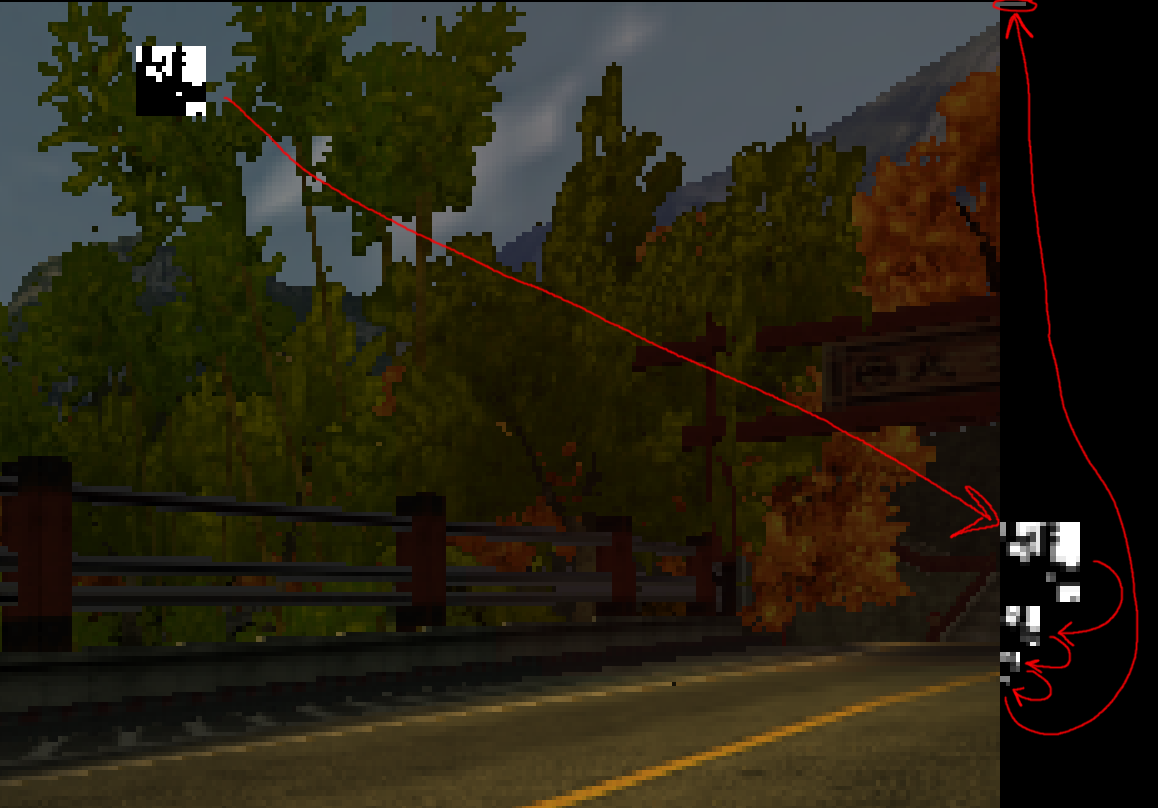
First, it makes a backup copy of a 14x14 rectangle around the sun location on-screen, and then renders a black and a white rectangle on top, with only the black one being depth tested. The result is a binary mask of where the sun is visible.

It then downsamples (through bilinear filtering) this binary image to 8x8, sitting out in the unused border of the main framebuffer. Then, it downsamples this 8x8 image three more times, until we reach a single value, which is thus the average of the black and white pixels, and thus an effective measurement of the coverage. The final value is for some obscure reason spread out over four pixels.

Picture of downsampling

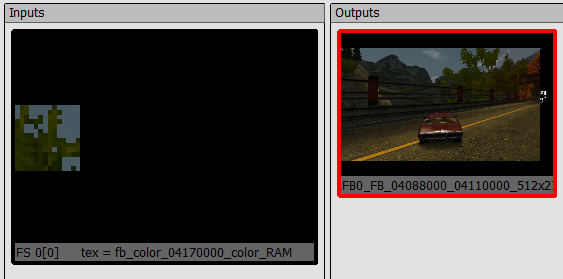
After that, it restores the little modified square of image the way it was, using the backup copy from before:

Restored image region

Applying the coverage value

So, we now have the coverage as a byte value. We could now treat this value as a 1x1 texture and let it influence the brightness of basic gouraud shaded geometry, like some simple hexagons and stuff, could look OK. Ridge Racer, for example, stops here (though uses a simpler accumulation method) - it draws simple shapes.

But Burnout gets fancier, and uses a nice lens flare texture. We are now faced with the challenge of how to use this arbitrary value sitting in an image, to influence the brightness of the lens flare texture, using only the PSP GPU. We do not want to use the CPU to copy the brightness value to some vertex colors, for example, as that would require expensive synchronization, instead we need to coax the GPU to do the work directly.

If we had multitexturing with combiners, or even shaders, we’d just sample this texel and multiply the lens flare texture by it, but we don’t have that. However, the PSP has some others features we can use - or misuse. Games on the PSP mostly use palletted textures, 4-bit or 8-bit indexed color. Palettes can be loaded from RAM or VRAM. And that opens up for a cute trick: Since on the PSP, memory is just memory, the game can actually overlay a render target on top of the palette memory belonging to the lens flare texture in memory, and render into the alpha channel of this render target, while texturing from a 1x1 texture carefully defined to overlap the brightness value from the previous coverage computation in memory! Then it can finally draw the lens flare using a texture with that modified CLUT loaded, which now has the correct alpha value in all colors, matching the coverage.

A problem with a deep solution

Except… The PSP is actually not able to write arbitrary values into the alpha channel of a 32-bit render target, at all! Not sure exactly why that is, but it is likely related to the fact that on the PSP, the alpha and stencil buffers share bits. So how do we actually accomplish it anyway, given that we just stated that it’s impossible?

This is where we get to the next level of trickery. When the game renders to the CLUT, it doesn’t use 32-bit color, instead it uses 16-bit “565” color, setting the render width to be 512, twice the size of the palette. Now, every second 16-bit pixel can be used to control the A and B channels of a color, and the other ones will control the G and R channels. The mapping is not trivial, let’s try to see that:

The same 32 bits in memory (each letter represents is 1 bit):

AAAAAAAA BBBBBBBB GGGGGGGG RRRRRRRR (one 32-bit color value)
bbbbbggg gggrrrrr bbbbbggg gggrrrrr (two 16-bit color values)
11111111 00000000 11111111 00000000 (bitmask for writing, see below)

When I said that it textures from the coverage value and writes it to the palette, what it really does is that it textures using another palette with a green-blue gradient to translate the coverage value into the appropriate green and blue bits to properly fill the alpha channel of the 32-bit CLUT entries, by rendering using 16-bit colors! The PSP GPU conveniently has a framebuffer bitmasking feature, where you can prevent writing to specific bits of each color value when rendering (modern GPUs don’t have that, they have a bit per channel instead), and it sets what's effectively a repeating 0xFF00 16-bit mask.

That creates a new problem though, it will now write that value to green as well in the corresponding 32-bit color values, as we can see in the diagram, which we don’t want. The color write bitmask is applied individually to each 16-bit pixel here, so that’s not very useful. So what can we use to mask away the writes to every other pixel? Well we are in fact using a GPU, so why not initialize a Z buffer with 0, 32767, 0, 32767, and use depth testing to discard every second value? And that’s what the game does, drawing to the palette, using a depth value and a depth compare function to make sure only every second 16-bit pixel actually gets written.

The result

And we reach the final moment, where the coverage value sits properly in the alpha channel of each entry of the color palette of the lens flare texture, and we can just do a simple draw to get it on the screen with the appropriate brightness.

Finally, we have:

Subtle working lens flare Bright working lens flare

And a video:

Phew! Getting this to work in PPSSPP was.. not trivial. I could write a whole other article about the improvements that needed to be done to the rendering pipeline so that all of the tricky steps above would actually work correctly.